Manage a Team
Strong team operations ensure players see the right content at the right time. Use this guide to stay on top of roster changes, permissions, and season transitions in VReps.
Roster Maintenance
- Visit Teams → [Team Name] → Roster weekly to confirm who is Active, Pending, or Archived.
- Use the Bulk Actions menu to move graduating players into
Archivedstatus. - Export the roster before major changes so you have a backup of historical data.
Add or Remove Members
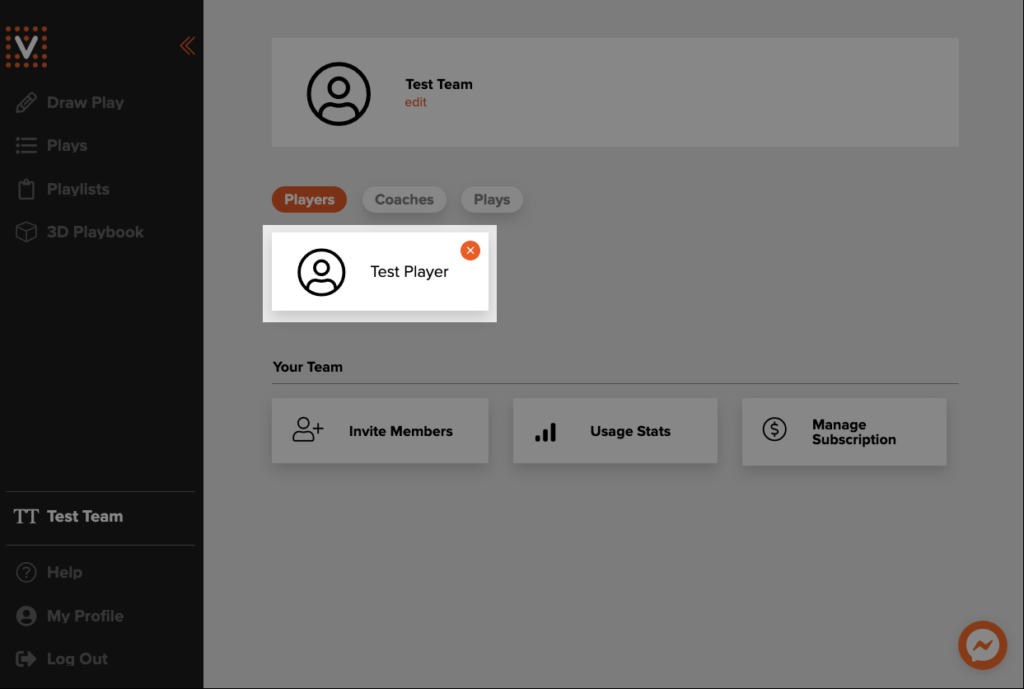
- Click your team name in the sidebar to open the team profile, then choose Invite Members to generate a fresh invite link and code. Share it with players and assistants to onboard them in seconds.
- Remove an existing member by selecting the orange × beside their name and accepting the confirmation prompt.
Permissions & Staff Roles
- Reserve the highest permission level for your lead coaches; those accounts control billing, teams, and sensitive data.
- Promote assistant coaches to Coach (Manage) when they need to publish content on their own.
- Use Contributor for volunteers who draft content but do not publish live updates.
Monitor Engagement
- Dashboards under Team → Activity show completion rates by lesson, play, and assignment.
- Filter by player position or level to identify segments that need extra coaching.
- Download CSVs for deeper analysis or to share with program directors.
Season Transitions
- Duplicate key collections or lesson plans for the new season.
- Archive the old season in Team Settings so analytics stay focused on current players.
- Update team branding (colors, logo) if uniforms or sponsors changed.
- Review tags and retire any that no longer apply.
Communication Best Practices
- Schedule a bi-weekly team announcement to highlight new content.
- Reply to player reflections directly in the portal to keep everything in one place.
- Encourage players to turn on push notifications so urgent messages land immediately.
Troubleshooting Ops Issues
- If players do not see content, confirm they are assigned to the right team and the lesson is published.
- Ensure scheduled releases are in the correct time zone—especially during travel tournaments.
- See Account Management for password resets or profile fixes.